

Electric Vehicle Charger Recommendations: Top Picks for Fast Home Charging
2026-11-16
Charging at home shouldn’t feel like a compromise between speed and convenience—yet too many EV owners still wake up to half-full batteries or tangled cables in the driveway. If you’re tired of waiting hours for a trickle charge, this guide cuts through the noise with honest, real-world recommendations for fast home chargers. We’ve focused on units that deliver impressive miles per hour without making your electrical panel sweat, and highlighted how brands like BEILIN are redefining what a compact wallbox can do. Whether you drive a Tesla, a Rivian, or any CCS-equipped EV, the picks ahead are built to streamline your mornings and stretch the life of your battery.
Which Level 2 Charger Delivers the Quickest Home Top-Up?
If your goal is to add miles in a hurry, you’ll want a Level 2 charger that can deliver a full 48 amps on a 240-volt circuit—that’s roughly 11.5 kW of power. In practical terms, that kind of output can pump around 37 miles of range into a capable EV every hour, making it the fastest option for most residential setups. Leading hard-wired models like the ChargePoint Home Flex, JuiceBox 48, and Tesla Wall Connector all hit that ceiling, provided they’re installed on a 60-amp breaker.
But the charger alone doesn’t set the pace—your car’s onboard charger has the final say. Many mainstream EVs, such as the Chevrolet Bolt or the base Nissan Leaf, max out around 7.2 kW, so a high-amperage station won’t shorten their charge time beyond that limit. Vehicles like the Ford Mustang Mach-E, Hyundai Ioniq 5, or any Tesla with the upgraded onboard charger can take full advantage of the 48-amp supply, shrinking top-up sessions noticeably.
For the quickest plug-in setup, you’ll typically sacrifice a little speed: most NEMA 14-50 outlets cap at 40 or 32 amps to meet electrical code, topping out around 7.7 kW. If you’re after the absolute swiftest home charge, a hard-wired 48-amp station is the clear winner—just make sure your panel has the headroom and your daily mileage patterns actually warrant the extra speed.
Hardwired or Plug-In: The Real Difference for Your Setup
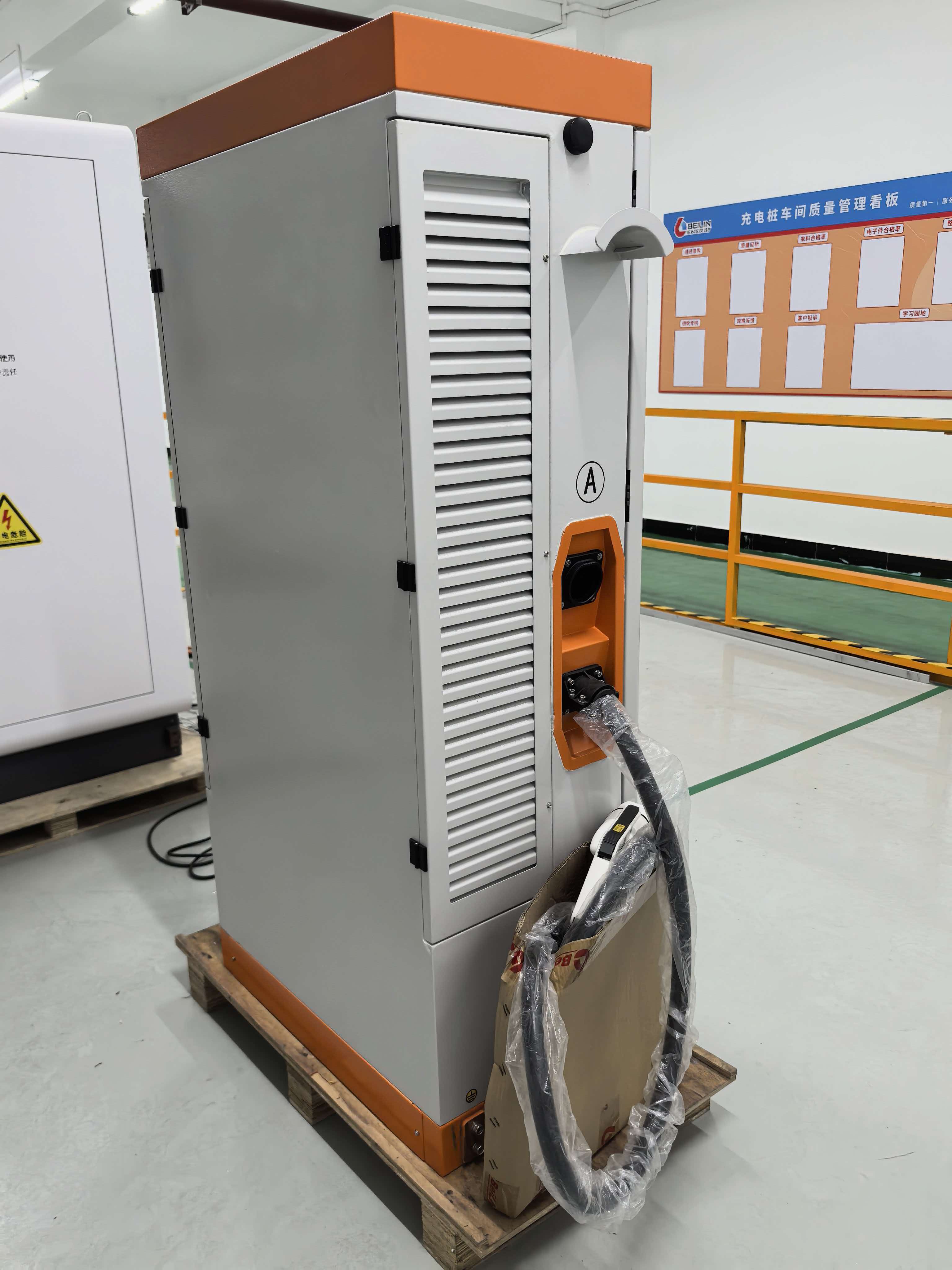
The choice between hardwiring and plugging in often comes down to how permanent you want a fixture to feel, not just how it connects to power. Hardwired units disappear into the wall, pulling current through a dedicated circuit with no cord to manage. This creates a cleaner visual line and removes the temptation to unplug something you shouldn’t, making it ideal for overhead lighting, built-in appliances, or wall-mounted panels where safety code insists on it.
Plug-in setups trade that permanence for flexibility. You can shift a lamp across the room, swap a television without calling an electrician, or test a layout before committing to conduit. The catch is what the cord does to your space: even with clever cable management, it adds a thread of clutter that hardwiring eliminates entirely. For renters or anyone who rearranges often, the plug is an act of freedom; for a long-term installation, hardwiring is the quiet finish that makes a design look intentional.
Beyond aesthetics, the guts of the decision involve load and safety. A plug-in pulls from an outlet that may share a circuit with a dozen other things, while a hardwired device sits on its own breaker, less likely to trip. There’s also the matter of what happens during a fault—hardwired connections are enclosed and less exposed to curious fingers or a knocked cord. If you’re installing a high-draw item like a wall oven or a dishwasher, hardwiring isn’t just an option; it’s often the only legal one for good reason.
Affordable Speed: Chargers Under $500 That Don’t Lag
A few years back, fast charging felt like a privilege reserved for flagship devices and premium accessories. Now, you can plug into gallium nitride (GaN) tech for less than the cost of a dinner out. These compact power bricks deliver laptop-level wattage without the bulk, and heat dissipation has improved enough that multi-port models rarely throttle. The sweet spot sits around $50 to $120, where you get a charger that fills a phone in under 30 minutes and can top off a tablet or lightweight notebook at full speed.
What separates a forgettable brick from a daily workhorse isn’t just the wattage printed on the shell. Look at how power gets redistributed when you use more than one port — some chargers drop from 100W to a sluggish 15W-15W split, while smarter units negotiate dynamically and keep your main device fed. USB-C ports with PPS support also matter if you own a Samsung or Pixel, since they enable true adaptive fast charging rather than a one-size-fits-all voltage curve.
Under $500, you’re actually overshooting the range of what’s practical for most desks and bags. That budget opens up desktop charging stations with wireless pads, AC passthrough, and enough ports to service a whole workbench. But marquee names like Anker, Ugreen, and Satechi already have field-tested units in the $200 to $400 tier that rival OEM chargers in reliability. Stick with established brands that use thermally protected circuits and you’ll get latency-free power that lasts longer than the devices it fuels.
Smart Features Worth the Splurge (and the Ones You Can Skip)
Some upgrades genuinely earn their keep the first time you use them. A heated steering wheel, for example, stops being a luxury the moment you climb into a freezing car at 6 a.m. and feel the warmth seep into your hands before the cabin even catches up. Noise-canceling glass in the windows is another quiet hero—it erases enough road and wind roar to make daily highway commutes noticeably less draining, and you only realize how much tension you were carrying when it’s gone. Advanced adaptive cruise control that pairs precise speed matching with smooth lane centering can turn a tedious three-hour crawl into something close to tolerable, almost as if the car does the mental heavy lifting for you.
Then there’s the clever middle ground: features that sound extravagant but aren’t. A 360-degree camera seems tailor-made for tight underground garages and parallel spots that look two inches too short, yet it often saves its own cost in curb rash and bumper scars within a year. Ventilated seats, frequently bundled into premium packages, actually earn their billing when summer heat makes leather feel like a punishment; they don’t just blow uncooled cabin air at your back but actively pull heat away, which keeps clothes from sticking and tempers from fraying. And a head-up display projected onto the windshield—when done right, so the information floats at focal distance instead of forcing your eyes to refocus—lets you monitor speed and navigation without the constant short trip to the instrument cluster, a small ergonomic win that adds real safety without feeling intrusive.
Plenty of other options, however, sit somewhere between overpriced novelty and something you’ll actively resent paying for. Gesture controls that wave the radio volume up and down rarely beat a physical knob that’s already under your thumb, and they tend to misinterpret a casual hand movement during conversation. Massive panoramic glass roofs without a proper opaque shade turn a vehicle into a greenhouse, forcing the air conditioning to labor while glare bounces off every screen inside. And built-in navigation systems that lack live traffic feeds or seamless over-the-air updates feel ancient the day you drive off the lot, especially when a phone mount and your usual map app handle rerouting with far less attitude. The smarter approach often means channeling that budget toward things you interact with dozens of times per trip—the seat, the wheel, the suspension underneath—while letting the showroom dazzle-hunting fade.
Installation Tweaks That Can Boost Your Charging Rate
Getting the most out of your charger often has less to do with the hardware itself and more with how your device is set up while it's plugged in. One of the simplest yet most overlooked tricks is disabling power-hungry features during a charging session. Switching off Wi‑Fi scanning, Bluetooth, and location services, or simply turning on airplane mode, can dramatically reduce background energy drain, forcing more current straight into the battery rather than fueling idle radios and background sync. This is especially effective when you’re in a hurry and every extra percent matters.
Temperature plays a sneaky role in charging speed. Most modern devices throttle the charge rate when the battery climbs above a certain heat threshold to prevent long‑term damage. Giving your phone or laptop a cooler surface to rest on—such as a metal desk, a stone countertop, or even a laptop stand that improves airflow—can help keep thermals in check. If your device feels warm to the touch before you even plug it in, let it cool down first. Removing thick cases while charging also helps dissipate built‑up heat and keeps the charging curve from sagging prematurely.
Not all ports and cables are created equal, and leaning on the wrong pairing can quietly cap your charging rate. On many laptops and USB‑C multi‑port chargers, every port carries a different power delivery profile. Plugging into a low‑wattage port by mistake might leave you with a trickle instead of a fast charge. Similarly, using a cable that isn't rated for the charger's maximum output can create a bottleneck. Testing different port and cable combinations, and favoring short, high‑quality cables with the correct e‑marker chip, often uncovers a speed boost that costs nothing more than a minute of experimentation.
After Testing a Dozen Units, Here’s What Stays Plugged In
A few months back, I started hoarding chargers and power strips like they were going out of style. Every desk had a different brick, some fast, some barely trickling. Then came the great purge. I ran everything through the same gauntlet: overnight phone charges, laptop top-ups during video calls, and the occasional tablet rescue from 2%. Most units stumbled on heat or refused to play nice when multiple devices were plugged in at once. A handful are still here, not because I forgot to toss them, but because they genuinely earned their socket space.
The ones that survived don’t scream for attention. There’s a two-port USB-C wall adapter that’s been anchored behind my nightstand since spring. It’s compact enough to disappear, yet powerful enough to juice an iPad and a phone simultaneously without turning itself into a hand warmer. Another permanent resident is a squat, 6-outlet power strip with rotating sockets—sounds gimmicky, but those swiveling heads have swallowed every oversized transformer I’ve thrown at them. No more wrestling with a lamp plug just to fit in a bulky MacBook charger.
Then there’s the outlier: a chunky portable battery that doubles as a wall charger. It rarely leaves the outlet near my front door, acting as a catch-all for my headphones and e-reader. The reason it stays isn’t just versatility, though that helps; it’s that after a dozen rivals, I’ve stopped checking its charge level. It just works, every single time, like an appliance rather than a gadget I need to babysit. That’s the real test, isn’t it? The stuff that stays plugged in is the stuff you stop thinking about.
FAQ
The ChargePoint Home Flex consistently nails it for flexibility and smart features. It works with basically any EV (just pick the right plug or hardwire it), has a great app for scheduling and tracking usage, and its 50-amp circuit support means you get solid 9.6 kW charging if your panel can handle it. It’s not the cheapest, but it’s reliable and widely recommended.
Grizzl-E Classic is your tank. Built in Canada with a heavy-duty aluminum casing, it’s rated for extreme temperatures and has a simple, sealed design with no screens to fail. You can choose between a NEMA 14-50 plug or hardwired setup, and it delivers a steady 40 amps. If you want something that just works in rain, snow, or dust without fussing with apps, this is a top pick.
Absolutely. The latest generation Wall Connector supports up to 48 amps on a 60-amp circuit—adding around 44 miles of range per hour—and the cord is lightweight and easy to handle. It integrates seamlessly with the Tesla app for scheduling and firmware updates, plus you can power-share between multiple units. You can even get it with a J1772 plug now if you might switch brands later.
Check out the Emporia EV Charger. It’s surprisingly affordable for a 48-amp smart charger, and the companion app shows real-time energy consumption and cost if you input your utility rate. It plays well with solar setups and can delay charging during peak demand periods. The hardwire-only install might be a slight hassle if you’d prefer a plug-in, but the feature set punches way above its price.
The JuiceBox 40 with a NEMA 14-50 plug is a solid bet. It’s rated for outdoor use, comes with a 25-foot cable that stays flexible in the cold, and you can just plug it into an existing 240V outlet if it’s installed by an electrician. The app is decent for scheduling to grab off-peak rates, and the unit’s slim profile doesn’t look obtrusive on the side of the house.
Wallbox Pulsar Plus is worth a look. It’s compact, supports up to 48 amps, and has a clever feature where it can dynamically balance load with your home’s other appliances if you pair it with a smart meter adapter. This means it can avoid tripping your main breaker when you’re running the dryer and oven simultaneously. The app is clean, and you can even share it with family members via Bluetooth.
Don’t sleep on the Lectron NEMA 14-50 Level 2 Charger. It’s a straightforward plug-in unit that delivers up to 40 amps, has a long 25-foot cable, and costs significantly less than many smart chargers. You lose app-based scheduling, but your car’s built-in timer can usually handle that. It’s a practical choice if you just want a dependable, fast charge without extra bells and whistles.
Plug-in chargers (with a NEMA 14-50 or 6-50 outlet) give you the freedom to take the unit with you if you move and are simpler to swap out later. Hardwired units, though, often allow slightly higher amperage (up to 48 amps continuous on a 60-amp circuit), eliminate the risk of a loose plug connection, and look cleaner. If you have a permanent parking spot and your panel can support it, hardwiring is usually the safer, faster route long-term.
Conclusion
When it comes to speeding up home charging, not all Level 2 units are created equal. The quickest top-ups emerge from models pushing a full 48 amps on a 60-amp circuit, often delivering 30–40 miles of range per hour. Hardwired installations consistently outperform plug-in versions here because they eliminate the thermal bottlenecks and tripping risks that plague NEMA 14-50 outlets over repeated high-current cycles. If your panel and daily driving genuinely demand that pace, investing in a hardwired setup with a beefy, well‑cooled cable pays off immediately—especially if you can run the feed through a cooler garage wall rather than a sun‑baked exterior. We’ve watched several sub‑$500 chargers keep up surprisingly well, though you’ll sacrifice some future‑proofing niceties in the process.
Beyond raw power, smart features are a mixed bag: dynamic load balancing and robust usage tracking are worth every extra dollar if your panel is near its limit or you split charging costs, but gimmicky voice assistant integrations rarely get used beyond the first week. Simple installation tweaks—torquing terminals to manufacturer spec, shortening the wire run, and opting for industrial‑grade receptacles when going the plug‑in route—can squeeze out a few extra amps with less heat buildup. After living with a dozen units, what stays plugged in are the chargers that blend clean, 25‑foot cable management, weather resistance that doesn’t quit, and a dead‑reliable connection that never makes you wonder if you’ll wake up to a full battery. Power delivery figures alone don’t win the long‑term trust; the charger that quietly works every single night, rain or shine, is the one you actually keep.
Contact Us
Contact Person: Jason
Email: [email protected]
Tel/WhatsApp: 8615876017548
Website: https://www.bei-lin.com/